Agent
Route: /agent — Source: ui/src/pages/AgentPage.tsx
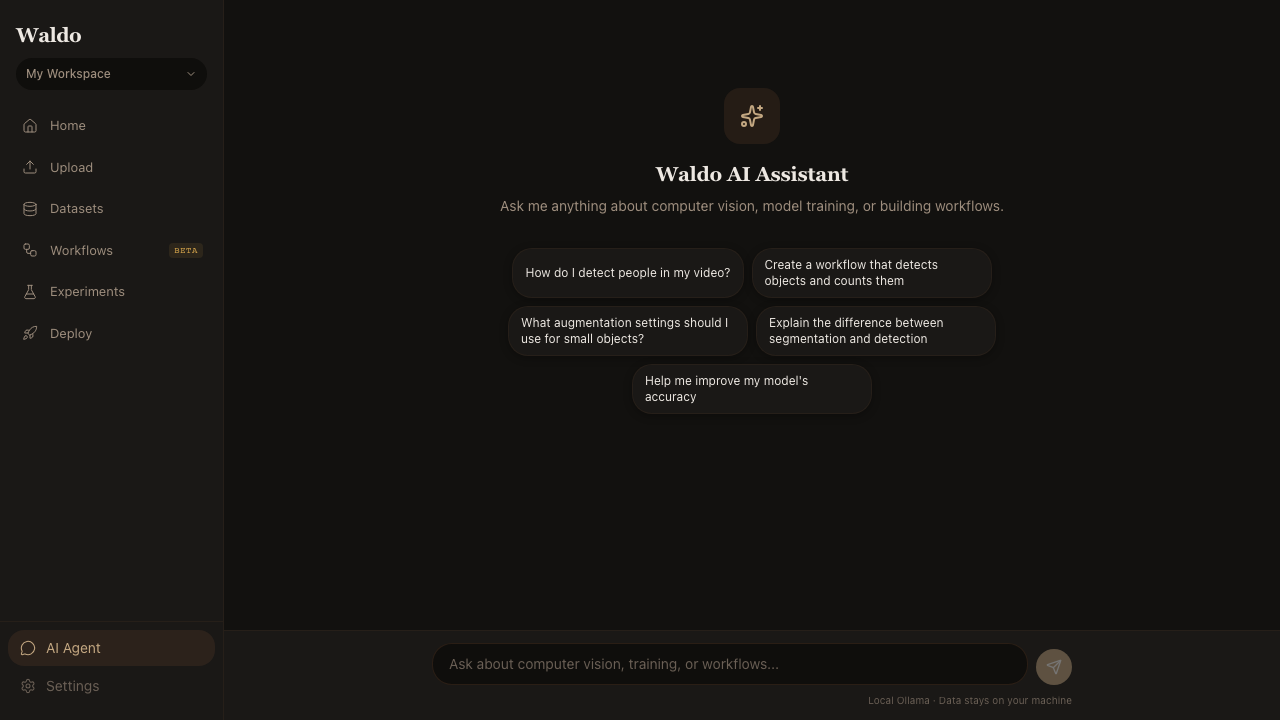
Waldo ships a LangGraph ReAct agent wired up to the platform's own data and actions. You ask questions in plain English; the agent calls real Waldo tools (read-only and side-effecting), shows you which tools it ran, then gives you the answer. The LLM runs locally via Ollama — nothing is sent to a third-party API.
What it can do
The agent has these tools available, all auth-scoped to your workspace:
| Tool | Type | What it does |
|---|---|---|
list_projects | read | List projects with video counts |
list_videos | read | List uploaded videos (optionally filtered to a project) |
list_datasets | read | List completed labeling jobs with annotation counts |
list_models | read | List trained models with mAP and active state |
list_training_runs | read | Recent training runs with progress |
get_system_info | read | Hardware probe — CUDA/MPS/CPU, dtype, active model |
get_training_tips | read | Hyperparameter recommendations for a dataset size + task |
start_labeling_job | action | Queue a SAM-3 auto-label run on a video |
start_training | action | Queue a YOLO training run on a labeled dataset |
activate_model | action | Mark a trained model active for /predict/* |
The full-page agent (/agent) defaults to action mode — if you ask it
to "label cars on my latest video and start training," it will. Tick the
Read-only toggle in the footer to constrain it to inspection tools.
The floating AgentPanel (the spark icon in the lower-right of every page) is read-only by design — open the full page to take actions.
How it works
   you ──▶ AgentPage  ──▶  /api/v1/agent/stream  (SSE)
                              │
                              ▼
                       LangGraph ReAct loop
                       (lib/agent/graph.py)
                              │
                              ├──▶ ChatOllama ── http://ollama:11434
                              │
                              └──▶ ToolNode ──▶ list_models, start_training, …
                                       (auth-scoped to your workspace)
Each /agent/stream request runs the loop inside an AgentContext that
pins every tool call to your user + workspace. The LLM sees the system
prompt, your message history, and the tool descriptions; it decides whether
to answer or to call a tool; the loop iterates until it has a final answer.
The endpoint streams Server-Sent Events:
data: {"type":"tool_call","name":"list_models","args":{}}
data: {"type":"tool_result","name":"list_models","content":"Models (2): …"}
data: {"type":"token","content":"You have two trained models …"}
data: {"type":"done"}
The UI renders each tool call as an inline pill so you can see exactly what the agent did.
Try it
Suggestion chips on first load (and a few you can paste yourself):
- "What models are trained in this workspace?"
- "Recommend training settings for a 200-frame dataset"
- "Start a labeling job for 'person' on my latest video"
- "Activate the model with the best mAP"
- "Am I running on GPU or CPU right now?"
Configuration
| Var | Default | Purpose |
|---|---|---|
OLLAMA_URL | http://ollama:11434 (in compose) | Where the local LLM lives |
AGENT_MODEL | gemma4:e4b | Ollama tag the agent loads |
AGENT_TEMPERATURE | 0.2 | Lower = more stable tool-call JSON |
The ollama service in docker-compose.yml runs on the same network and
the ollama-init one-shot pulls ${WALDO_AGENT_MODEL:-gemma4:e4b} so the
first chat works the moment the app reports healthy. To swap models:
# Edit .env
AGENT_MODEL=qwen3:4b
WALDO_AGENT_MODEL=qwen3:4b

# Pull and restart
docker compose run --rm ollama-init
docker compose restart waldo-app
Health check
TOKEN=$(curl -s -X POST http://localhost:8000/api/v1/auth/login \
  -H "Content-Type: application/json" \
  -d '{"email":"admin@waldo.ai","password":"waldopass"}' \
  | jq -r .access_token)

curl -s http://localhost:8000/api/v1/agent/health \
  -H "Authorization: Bearer $TOKEN" | jq
Returns whether Ollama is reachable, whether the configured model is pulled, and lists the other models the local Ollama can serve.
Troubleshooting
/agent/chat returns 401 even though I'm logged in.
You're loading a stale UI bundle from before the agent was wired up — the
old bundle hits /api/v1/agent/chat with the wrong content-type and the
backend rejects it. Hard-refresh the browser:
- Chrome / Edge:
Ctrl+Shift+R(Windows / Linux) orCmd+Shift+R(macOS) - Or DevTools → right-click reload → Empty Cache and Hard Reload
If you upgraded Waldo with git pull after PR #3, also rebuild the app
image so the new SPA is baked in:
( cd ui && npm run build ) && \
  docker compose --profile nvidia up -d --build waldo-app
(./install.sh does both of these for you on every run.)
/agent/chat hangs for ~30s then errors.
The model isn't loaded yet. On first boot, ollama-init pulls gemma4:e4b
(~9.6 GB) — that takes 5–10 minutes on a typical home connection. Watch:
docker logs -f waldo-ollama-init-1
When the pull finishes, docker exec waldo-ollama-1 ollama list will show
the model. Subsequent chats are sub-second after the first prompt warms
the model into memory.
Ollama container is unhealthy and waldo-app won't start.
The healthcheck uses ollama list (the CLI bundled in the image — curl
isn't). If you see this on a host with limited GPU memory, check
docker logs waldo-ollama-1 for OOM or device errors. Free up VRAM by
setting a smaller model:
# .env
AGENT_MODEL=gemma4:e2b           # ~7.2 GB instead of 9.6
WALDO_AGENT_MODEL=gemma4:e2b
…then docker compose run --rm ollama-init && docker compose restart waldo-app.
Privacy
Everything stays on your machine. The model is local. Tool calls touch your own database. No telemetry, no third-party LLM API calls.