UI Overview
The web UI is a Vite + React 19 + Tailwind 4 SPA. Source lives in ui/src.
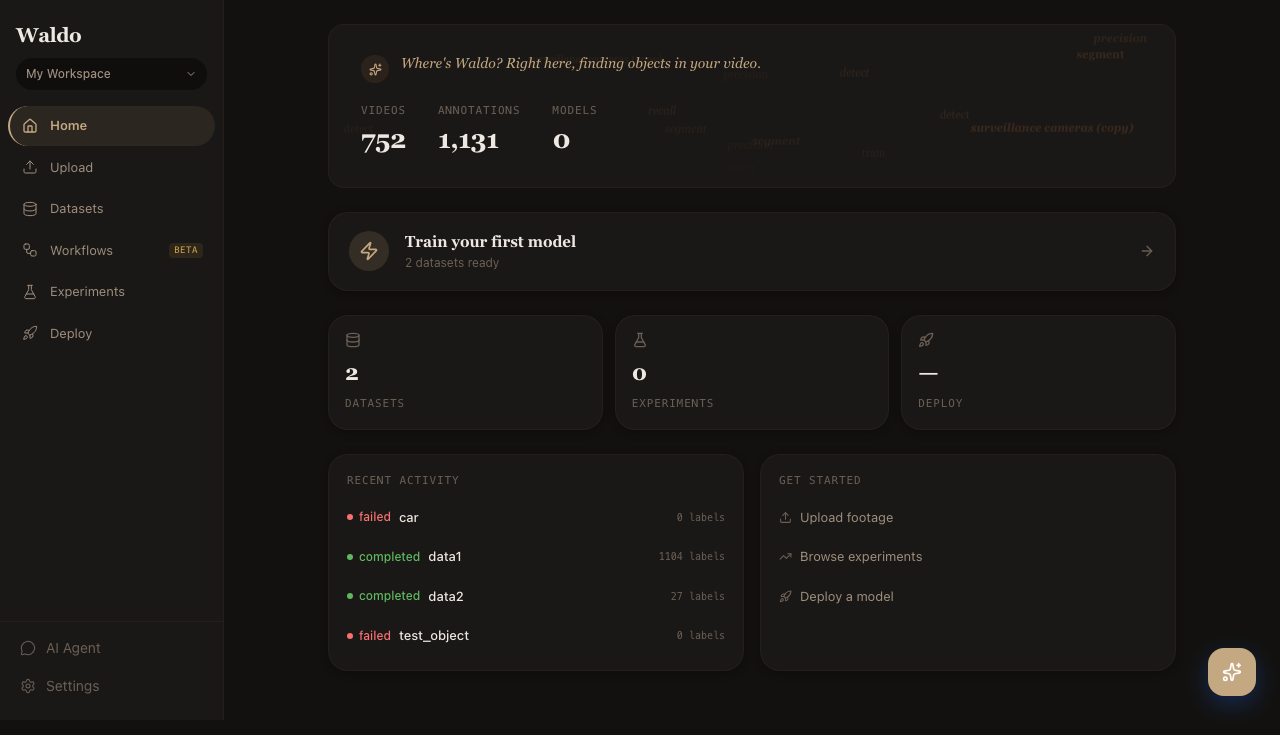
The dashboard is the landing page after sign-in. It shows your video count, total annotations, models in the registry, recent activity, and quick links to the next sensible action.
Pages
| Page | Route | Source |
|---|---|---|
| Login | /login | pages/LoginPage.tsx |
| Register | /register | pages/RegisterPage.tsx |
| Dashboard | / | pages/DashboardPage.tsx |
| Upload | /upload | pages/UploadPage.tsx |
| Collections | /collections | pages/CollectionsPage.tsx |
| Datasets | /datasets | pages/DatasetsPage.tsx |
| Label | /label/:videoId | pages/LabelPage.tsx |
| Review | /review/:jobId | pages/ReviewPage.tsx |
| Playground | /playground | pages/PlaygroundPage.tsx |
| Jobs | /jobs | pages/JobsPage.tsx |
| Train | /train/:jobId | pages/TrainPage.tsx |
| Experiments | /experiments | pages/ExperimentsPage.tsx |
| Workflows | /workflows | pages/WorkflowsPage.tsx |
| Workflow Editor | /workflows/new, /workflows/:id | pages/WorkflowEditorPage.tsx |
| Deploy | /deploy/:tab | pages/DeployPage.tsx |
| Agent | /agent | pages/AgentPage.tsx |
| Settings | /settings | pages/SettingsPage.tsx |
The deploy page has nested tabs (models, endpoints, test, monitor, edge) reachable via /deploy/<tab>.
State + data fetching
- Server state: TanStack Query (
@tanstack/react-query). Every API call is wrapped inuseQuery/useMutationfromui/src/api.ts. - Local state: Zustand for cross-page state (active workspace, theme, sidebar collapsed).
- WebSocket: A single connection per session, multiplexed by the server. Subscribed via
useWebSocket()— labeling progress, training logs, and edge-device heartbeats all stream over the same socket.
Design system
Pretext design system: serif headings, monospace eyebrow labels, CSS variables only (no raw Tailwind colors). Conventions live in ui/src/index.css. Reusable building blocks under ui/src/components/:
Button,Card,Stat,Badge,Toolbar,Sidebar- Form primitives (
Field,Select,Slider,Toggle) - Domain widgets (
AnnotationCanvas,VideoTimeline,MetricChart)
Stick to these when contributing — never use raw Tailwind color classes (text-blue-500, bg-red-200).
Screenshots & flow recordings
Every screenshot in this section is regenerated by Playwright. The script lives in docs-site/scripts/screenshots.spec.ts and is paired with recordings.spec.ts for short flow videos.
To regenerate everything against your local Waldo:
cd docs-site
npm install
npx playwright install chromium
export WALDO_TOKEN="$(uv run python -c 'from jose import jwt; from datetime import datetime, timedelta, UTC; \
  print(jwt.encode({"sub":"<your-user-id>","exp":datetime.now(UTC)+timedelta(days=1),"type":"access"}, \
  "waldo-dev-secret-change-in-production", algorithm="HS256"))')"
npm run screenshots
npx playwright test scripts/recordings.spec.ts
The screenshots scrape every route, the recording script captures short walkthroughs of the most-used flows.