Train Page
Route: /train/:jobId — Source: ui/src/pages/TrainPage.tsx
Configure and launch YOLO26 training runs against a finished labeling job. Live logs stream from the trainer worker over WebSocket.
Dataset quality pre-flight
Before you see the config form, the Train page pulls a dataset quality report from GET /api/v1/train/dataset-stats/{job_id} and renders it above the configuration. Catching a bad dataset here is cheaper than waiting an hour for a run to finish with poor metrics.
What it shows:
- Hero stats — annotated frames / total frames, total annotations, class count, and the imbalance ratio (
max_class_count / min_class_count). Imbalance ≥5× is highlighted in the warning color. - Class balance bars — one row per class with raw counts and percentage share, sorted by frequency. A 10× imbalance between
potholeandmanhole_coveris immediately visible. - Warnings — concrete, actionable lines generated server-side from the stats. Examples:
- "Only 42 annotated frames. Aim for 100+ per class for reliable training."
- "Class imbalance 18× between 'pothole' and 'streetlight'. Collect more rare-class examples or use class weights."
- "38% of objects are smaller than 1% of the frame. Training at 1280px is recommended so detail survives the backbone."
- "Rarest class has only 4 instance(s). YOLO needs at least ~10–20 per class to learn it."
- Recommended settings — a one-line summary of the variant / epochs / batch / imgsz / augmentation the server would pick for a dataset this shape. Click Apply recommended to copy those values into the configuration form.
The recommendations are dataset-size aware: under 50 frames gets yolo26n + aggressive augmentation + 150 epochs; 200–1000 gets yolo26s + standard; 1000+ gets yolo26m. imgsz bumps to 1280 when the small-object ratio is ≥25%.
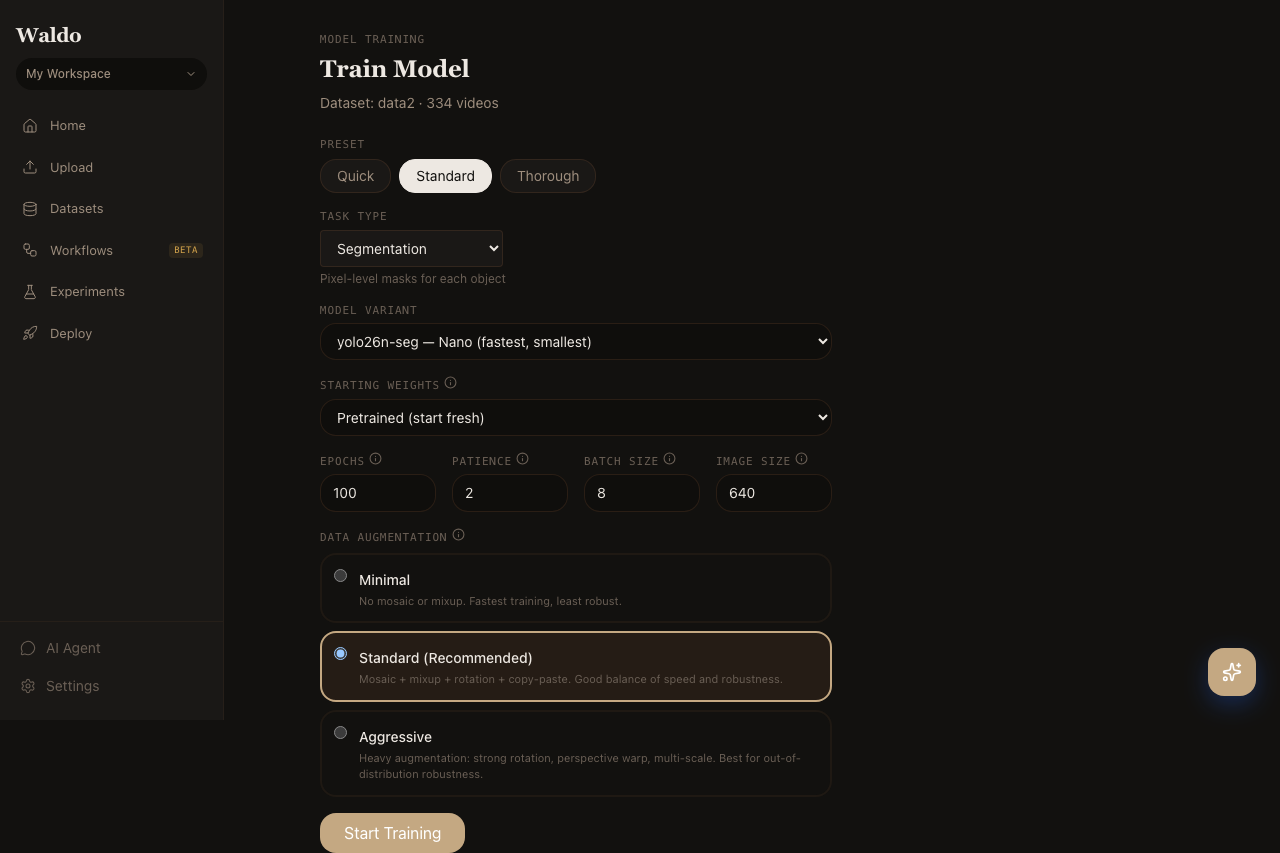
Configuration
| Field | Notes |
|---|---|
| Model | YOLO26 (yolo26n/s/m/l/x) — accuracy ↔ speed tradeoff |
| Task | Detection or segmentation |
| Pretrained | Start from COCO, Open Images, or a model already in your registry |
| Image size | 640 default; 1280 for small objects |
| Batch size | Auto if blank (Ultralytics picks based on VRAM) |
| Epochs | 50 is a sensible default; bump to 100+ for hard datasets |
| Augmentation preset | minimal / standard / aggressive |
| Learning rate | Auto by default; override for fine-tunes from a strong base |
The Standard preset is highlighted in the UI for a reason — it covers most cases. Pick aggressive only when you have lots of frames and want extra robustness.
Live progress
While a run is active, the page shows:
- Status badge —
queued,running,completed,failed,stopped - Epoch counter + progress bar with ETA
- Loss chart — box, cls, dfl losses streaming in
- Validation metrics — mAP@50 and mAP@50:95 per epoch
- Per-class performance card — precision / recall / mAP50 / mAP50-95 per class, populated from the Ultralytics validator. The metrics_streamer helper pulls
validator.metrics.box.{p, r, ap50, ap}every epoch and writes them underper_class/{class}/{metric}keys, which the UI reads directly. Final values are persisted intotraining_run.best_metricsaton_train_endso completed runs still show per-class breakdowns. - Live log tail with auto-scroll (toggle to pause)
You can stop a running training job from the same page (POST /api/v1/train/{run_id}/stop) — the trainer flushes the latest checkpoint and registers it.
After training
Successful runs auto-register a new model in the registry. From there you can:
- Activate it (
POST /api/v1/models/{model_id}/activate) so the default/predict/*endpoints use it. - Promote it to a labeled alias (
production,staging,canary). - Export to ONNX, CoreML, TFLite, or Edge TPU (
POST /api/v1/models/{model_id}/export). - Deploy to a named endpoint or push to an edge device.
Related API
POST /api/v1/train— start a runGET /api/v1/train/{run_id}— current statusPOST /api/v1/train/{run_id}/stop— graceful stop