Datasets Page
Route: /datasets — Source: ui/src/pages/DatasetsPage.tsx
The Datasets page is the home for everything dataset-related: browse, drill into one to see videos and labeling jobs, kick off new auto-label runs, and import existing data.
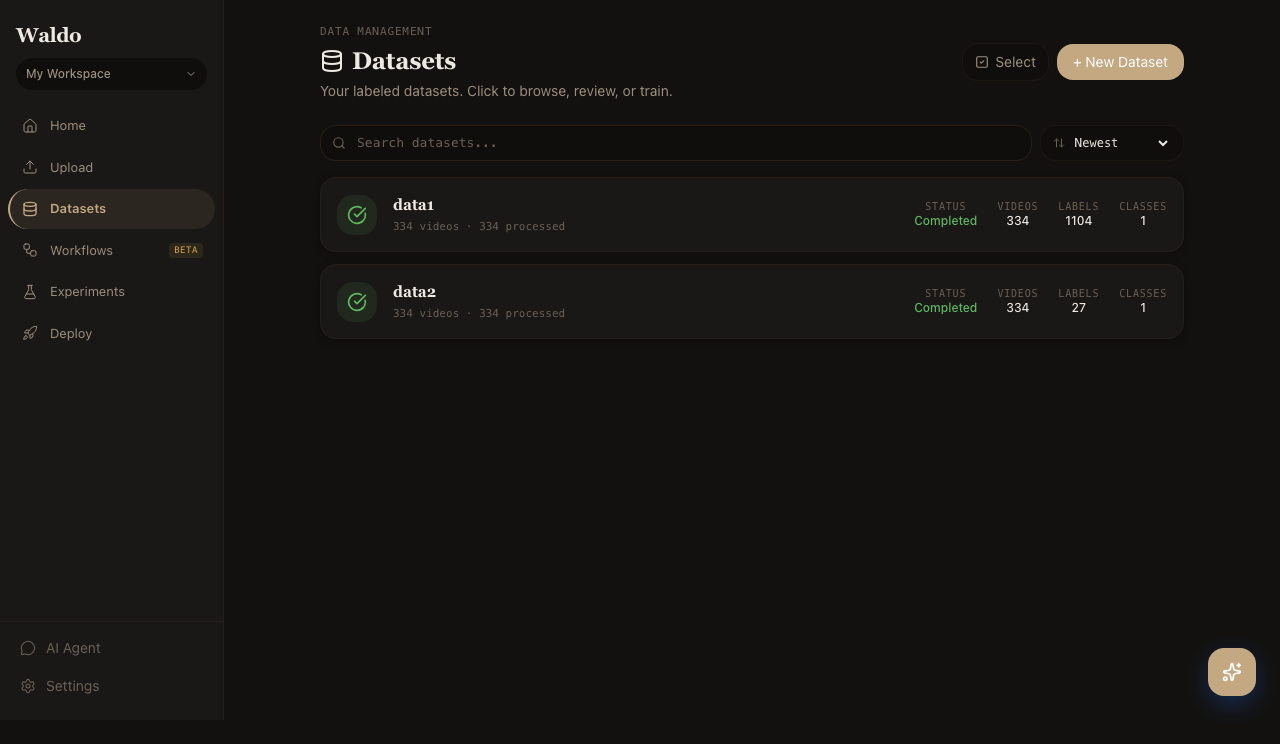
What you can do here
- Create datasets — name them; they're scoped to your active workspace.
- Search & sort — the toolbar filters live as you type; sort by newest, name, video count, or label count.
- Drill into a dataset card — see videos, labeled frames, classes, and the latest labeling job state.
- Import — pull existing YOLO directories from disk or register MinIO objects without re-uploading.
- Upload videos — drop files or batch-upload via the URL list.
- Configure prompts — define text or visual prompts at the dataset level so new uploads auto-label automatically.
Anatomy of a dataset card
| Field | Meaning |
|---|---|
STATUS | pending, running, completed, failed from the most recent labeling job |
VIDEOS | Count of Video rows in the dataset |
LABELS | Count of Annotation rows across all jobs |
CLASSES | Distinct class_name values currently labeled |
Notable interactions
- Card expansion calls
GET /api/v1/jobs/{job_id}/overviewfor inline stats so the list itself stays fast. - The import panel is hidden by default — toggling it sets a
?showImport=1query param so URLs are shareable. - TanStack Query caches results with a 5-minute
staleTime; pull-to-refresh forces a refetch.
Related
- Upload API — endpoints behind the upload panel
- Label page — kicks off SAM 3 against a dataset
- Workflow blocks — chain dataset operations into a graph